
One Link to Rule Them All
How one shareable URL handles rich social previews, app deep links, and web redirects.
Sharing links is one of those features that sounds simple until you actually sit down to build it. “Just generate a URL and let people paste it places” - right?
The problem is that “sharing a link” means wildly different things depending on where that link ends up. Paste it into iMessage and you get a rich preview card with a photo and a title. Click it on a laptop and a browser is totally fine, but you’d still want something nicer than a blank page. Tap that link on your phone and you’d want it to open inside the app, not a browser. Don’t have the app? Now it should go to the web version.
That URL suddenly has a full-time job in marketing, routing, and damage control. This article explains how I built shareable links for Nomad with a single endpoint and some AWS magic.
The Problem in Full
When a user shares a place or a visit to a place in Nomad, there are four distinct audiences that link might reach. In all of these cases, if we view the link in a browser, app, or on a mobile device, we should see a nice preview card with the place name, photo, rating, and a button to open Nomad if they have it. There’s nothing worse than a social-centric app with links that are just links, with no preview or context.
| Audience | What they do | What they get |
|---|---|---|
| Mobile with app | Tap the link on their phone | App opens to the right screen - no browser |
| Mobile without app | Tap the link on their phone | Redirect to the web version (app.work-nomad.com) |
| Desktop | Click the link in a browser | Same web page: preview, photo, rating, “Open in Nomad” button |
| Crawler | iMessage, Slack, Twitter, WhatsApp, etc. fetch the URL | Rich card preview (Open Graph tags) before the human sees the link |
The Setup and Constraints
In Nomad, we have the following setup:
- A Flask API that serves the API endpoints.
- A React web app served separately from the API.
- A React Native (Expo) mobile app on iOS and Android.
If you’d like to check out the stack for Nomad, you can find it here.
The end goal is for users to be able to share a link to a place or a visit in Nomad that looks pleasing to the eye and works across all platforms.
https://share.work-nomad.com/abcd1234The Approach
Here’s the approach we’ll take to build this:
- Tokens are URL-safe random strings created when the user taps share.
- One API endpoint resolves a share by token and returns HTML or JSON depending on the
Acceptheader. - A share domain sits in front of that API with a CloudFront distribution so the link is short, stable, available, and presentable.
- The web app handles the human click-through experience, while universal links and app links hand off to Nomad when the app is installed.
Why this approach?
If you have a server-rendered app (Next.js, Remix, Rails, etc.), you can solve this more directly: routes in the web app can be automatically rendered with OG tags for every request. Your share link can be the web app’s page. Crawlers get the tags, browsers get the full page - same URL for both. This is why server rendered apps get much better SEO and social previews out of the box.
If you’re like me and you don’t have a server-rendered web app - an API-first stack, a separate SPA, or a mobile app with a minimal web presence - you don’t have a server-rendered page at the share URL. The approach below is built for that world: one API endpoint to resolve the data for the share, a pretty share domain in front of it, and a static or client-rendered landing page for when humans click through. No server-side framework required.
What to Avoid
There are three ways to build this that sound fine right up until you have to live with them:
Sharing a raw API URL (e.g. api.work-nomad.com/api/v1/public/share/xyz) would put an internal endpoint in front of users. API paths are long, brittle, and expose versioning and structure (/api/v1/public/...). A dedicated share domain (e.g. share.work-nomad.com/xyz) keeps the URL short, stable, and presentable. It’s the same backend, we’re just not putting the API’s face on the link.
Sharing a web app page as the share link (e.g. app.work-nomad.com/share/xyz) would require a server-side framework to render the page. Since the content is dynamically loaded, we cannot set appropriate OG tags or meta-refresh tags in the HTML.
Using resource IDs in the link (e.g. share.work-nomad.com/place/12345) makes paths guessable and enumerable. Anyone could try /place/1, /place/2. Tokens are nearly unguessable and don’t leak how many shares exist.
Tokens, URLs, and Endpoints
The share URL is dead simple on purpose https://share.work-nomad.com/<token>.
When a user taps the share button in the mobile app, it calls an endpoint, the API creates a share link, and returns the URL for that shared resource. Token is a URL-safe random string (e.g. secrets.token_urlsafe(32)):
share_link = ShareLink(
    token=token,
    resource_type=resource_type,  # "place" or "visit"
    resource_id=resource_id,
    created_by_user_id=current_user.id,
    expires_at=expires_at,
)
db.session.add(share_link)
db.session.commit()

return {"token": token, "url": f"{SHARE_BASE_URL}/{token}"}
One Endpoint, Two Formats
The API already has an endpoint that returns the share data in JSON (GET /api/v1/public/share/<token>). But we also need HTML: crawlers need OG tags, and browsers need a redirect to the web app. Along with that, exposing an API route like this for users to share is not ideal:
https://api.work-nomad.com/api/v1/public/share/<token>A small hack added to the GET /api/v1/public/share/<token> handler lets us serve different content to different clients. We branch on the request’s Accept header: when the client wants HTML we return the OG document plus a redirect to the React web app at https://app.work-nomad.com/share/<token>. Otherwise we return the raw share data as JSON, which is what the web app fetches to render the share preview page.
With this approach, we also avoid user-agent sniffing or maintaining two separate endpoints, and we’d rather let the request tell us what it wants than play detective with a user-agent string.
User-agent sniffing would mean reading the User-Agent header (e.g. “Slackbot”, “Googlebot”, “Safari”) to guess whether to return HTML or JSON. User-agent strings are unreliable, change between clients and over time, and can be spoofed. The Accept header tells us what the client actually wants with no guesswork.
Branching on Accept
The handler (pseudocode) looks up the share, checks expiry, builds the data, then branches on Accept:
def resolve_share(token):
    share = lookup_share_by_token(token)  # 404 if not found
    if share.expires_at and share.expires_at < now():
        return json_response({"error": "Share link expired"}, 410)

    data = build_share_data(share)

    # New logic to serve HTML if the client wants it
    if "text/html" in request.headers.get("Accept", ""):
        og = share_data_to_og(data)
        return render_og_html(og, token), 200, {"Content-Type": "text/html"}

    return json_response(data), 200
The HTML response
When the client asks for HTML, such as when iMessage renders a preview card, we return a minimal document: OG tags for crawlers and a meta-refresh that sends browsers to the web app. Link-preview crawlers read the tags and don’t follow the redirect. Humans get the meta-refresh and land on the web app. Same URL, different outcomes.
<head>
  <meta property="og:title" content="Figaro Coffee - Chicago, IL" />
  <meta property="og:description" content="Shared via Nomad" />
  <meta property="og:image" content="https://..." />
  <meta property="og:url" content="https://share.work-nomad.com/abc123" />
  <meta name="twitter:card" content="summary_large_image" />
  <meta http-equiv="refresh" content="0; url=https://app.work-nomad.com/share/{token}" />
</head>
<body>Redirecting...</body>
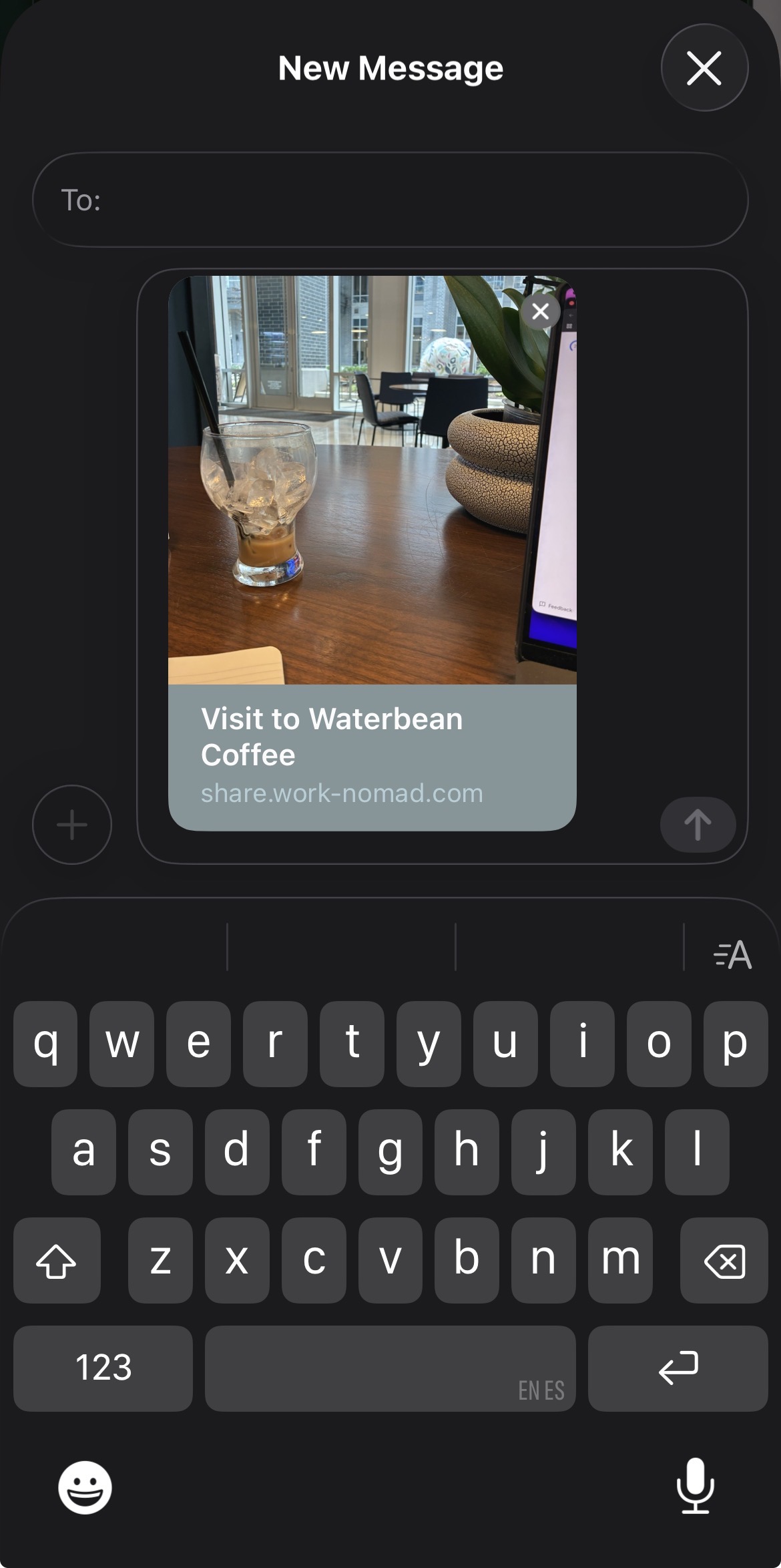
Our share links need to serve these OG tags to crawlers and browsers so the preview card shows up whenever a user shares the link.
Here’s how iMessage should display the preview card using the OG tags for Nomad:
CloudFront in front
The share subdomain (share.work-nomad.com) is not a web app or a separate service, it’s just a CloudFront distribution in front of the existing API.
For this CloudFront distribution the origin is api.work-nomad.com (the same load balancer the rest of the app uses). CloudFront’s origin path is set to /api/v1/public/share, so a request to share.work-nomad.com/abc123 becomes https://api.work-nomad.com/api/v1/public/share/abc123. No Lambda, no CloudFront Function, no little edge gremlin rewriting paths for me - the rewrite is built in.
share.work-nomad.com/<token>
origin_path = /api/v1/public/share
api.work-nomad.com/api/v1/public/share/<token>
Two quick notes on the CloudFront setup:
Caching. Most crawlers (iMessage, Slack, Twitter, etc.) aggressively cache OG tags on their end, so the data doesn’t need to be fresh on every request. We can set a 5 minute TTL for the HTML response. We’ll also only cache GET and HEAD requests since share links are read-only. This is a simple way to avoid unnecessary API calls and keep the API responsive.
DNS. The distribution is tied to the subdomain via an ACM (Amazon Certificate Manager) certificate for share.work-nomad.com and a Route53 alias record that points the hostname at the CloudFront domain.
The Mobile Side
Triggering a share
On the mobile app, the share flow is only a couple lines of logic in React Native. When you tap the share button on a place or visit, the app fires a mutation to create the share link and then hands the URL to Expo’s Sharing API:
const handleSharePlace = useCallback(() => {
  createShareLink.mutate(
    { resource_type: "place", place_id: place.id },
    {
      onSuccess: (data) => {
        Share.share({
          url: data.url,
          title: place.display_name,
        });
      },
    }
  );
}, [place.id, createShareLink]);
When we call Share.share(), we’re invoking the native iOS/Android share sheet - the same one that appears when you share a photo from your camera roll. The user picks iMessage, AirDrop, WhatsApp, whatever they want. Once the link lands in one of those apps, the app can crawl the URL and display the preview card with the place name, photo, rating, and a button to open Nomad if they have it. The URL goes wherever they send it, and the token does the rest.
Since share links are created on-demand and not when a visit is saved, this keeps the database lean, keeps created_by_user_id accurate, and gives better analytics per share since each share is tracked individually. It also saves me from generating a graveyard of links nobody ever shared.
Closing the Loop on Mobile
What about someone who receives a share link on mobile and taps it? Nomad uses universal links (iOS) and App Links (Android).
If they do have the app installed, they’ll be taken to the app with the token and the right screen will open, no browser needed.
If they haven’t downloaded Nomad yet, the share URL opens in the browser and redirects to the web app, which shows the preview and the “Open in Nomad” button.
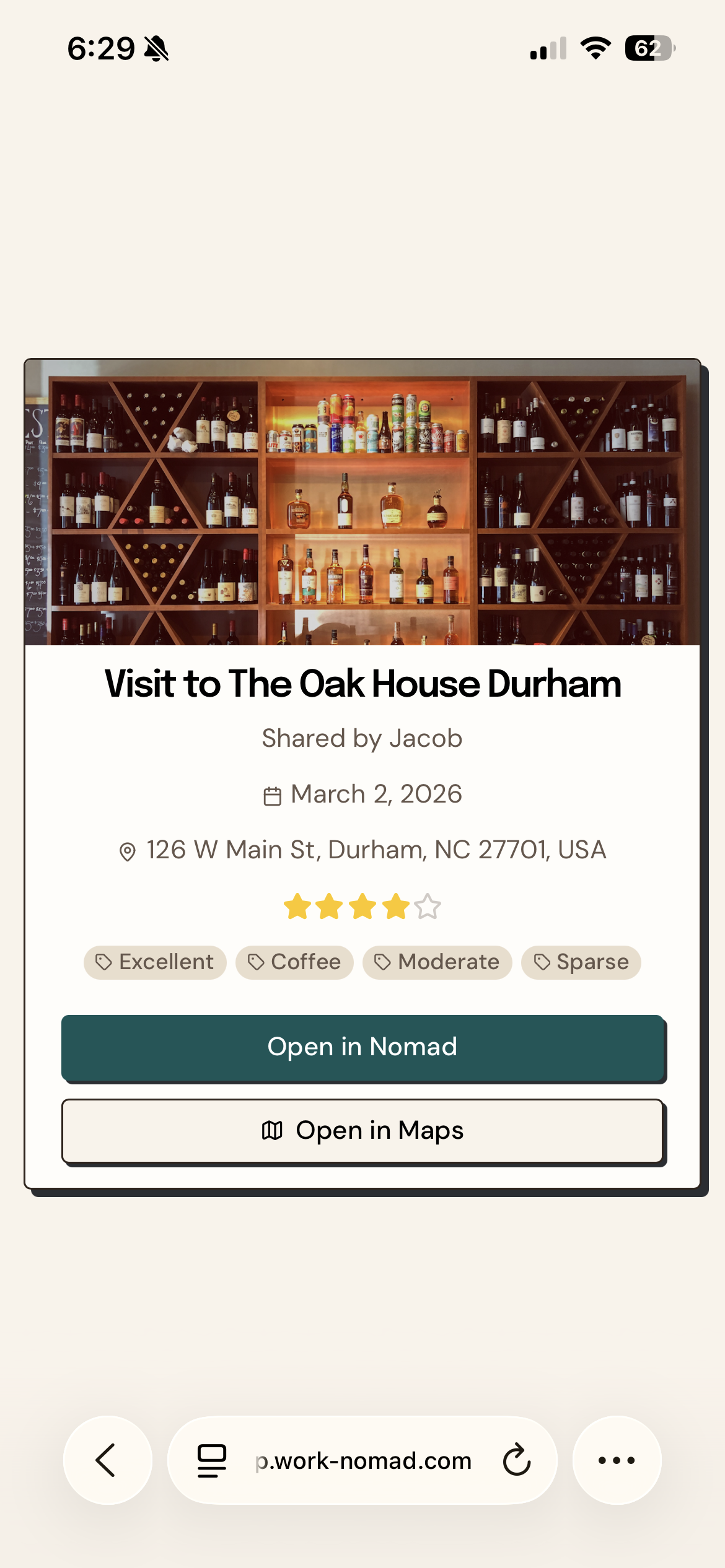
The “Open in Nomad” Button
Tapping the button on the web app preview fires a custom URL scheme deep link. If the app doesn’t open within a couple seconds, we redirect to the App Store for them to download the app:
const nomadAppUrl = `nomad://share/${token}`;

const handleOpenInApp = () => {
  window.location.href = nomadAppUrl;

  const fallbackTimer = setTimeout(() => {
    window.location.href = APP_STORE_URL;
  }, 2000);

  document.addEventListener("visibilitychange", () => {
    if (document.hidden) clearTimeout(fallbackTimer);
  });
};
The web app share preview page also sets the apple-itunes-app meta tag:
<meta name="apple-itunes-app" content="app-id=6756864669, app-argument=nomad://share/abc123" />This triggers the Safari “Open in Nomad” smart app banner - a bonus nudge toward the native experience.
The Bottom Line
The whole thing ends up being a surprisingly small amount of code for what it accomplishes: one endpoint, one CloudFront distribution, one token format. No per-platform routing, no separate preview service.
One URL, and a lot less to maintain. Sometimes the answer isn’t building more - it’s letting the same thing respond differently depending on who’s asking. The best design choices often come from doing less - from asking what’s actually needed instead of adding another path, another endpoint, another special case. It’s easy to assume every audience needs its own solution. Often they just need one thing that pays attention.
Want to try Nomad? Download it for free on the App Store.